Is there a way to pivot the angle on Z-Axis up or down (like looking down on a the mesh) vs going forward. By default it just goes forward.
Thanks,
Pivot angle on Z-Axis vs going forward in Blender.
Moderator: Moderators
-
r.macfarland
- Posts: 2
- Joined: Tue Jul 21, 2026 4:49 pm

Re: Pivot angle on Z-Axis vs going forward in Blender.
What exact Blender software version is installed on macOS?
We recommend to use the latest Blender software version. Additionally, you may want to read this online article on our website: https://3dconnexion.com/support/faq/set ... e-blender/
We recommend to use the latest Blender software version. Additionally, you may want to read this online article on our website: https://3dconnexion.com/support/faq/set ... e-blender/
-
r.macfarland
- Posts: 2
- Joined: Tue Jul 21, 2026 4:49 pm
Re: Pivot angle on Z-Axis vs going forward in Blender.
Yes, I'm on a Mac. I'm running the latest version of blender, v5.2 but I still can't tilt the view when I push forward.. It just goes forward and doesn't tilt down. How would you distinguish between going forward vs a tilt up/down?
Thanks,
Thanks,
Re: Pivot angle on Z-Axis vs going forward in Blender.
With Blender v. 5.20 and 3DxWare 10.8.13, i configured the settings as follows:
To align Blender's navigation behavior with the 3Dconnexion app 3DxDemo, open 3Dconnexion Home and select Properties.
In the Device list, select your SpaceMouse.
From the Configure: application list, select Blender. Apply the following settings:
Note: Leave Blender's Lock Horizon option unchecked.
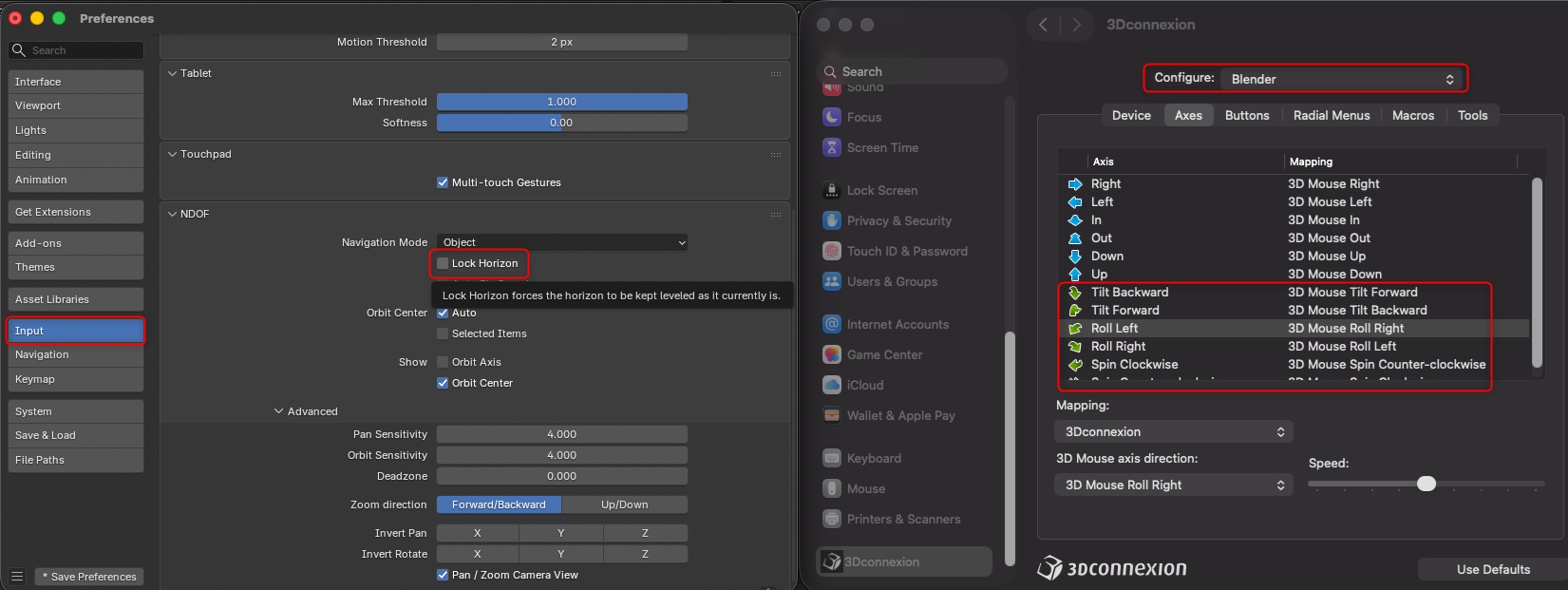
To align Blender's navigation behavior with the 3Dconnexion app 3DxDemo, open 3Dconnexion Home and select Properties.
In the Device list, select your SpaceMouse.
From the Configure: application list, select Blender. Apply the following settings:
- Tilt Backward → Tilt Forward
Tilt Forward → Tilt Backward
Roll Left → Roll Right
Roll Right → Roll Left
Spin Clockwise → Spin Counterclockwise
Spin Counterclockwise → Spin Clockwise
Note: Leave Blender's Lock Horizon option unchecked.