Wo ist das "new 3Dconnexion 3D Mouse Pop-Up Menu"?

Questions and answers about 3Dconnexion devices on Windows.

Moderator: Moderators

Post Reply
David.P
Posts: 77
Joined: Mon Aug 04, 2008 3:36 am

Wo ist das "new 3Dconnexion 3D Mouse Pop-Up Menu"?

Post by David.P »

Hi Forum,

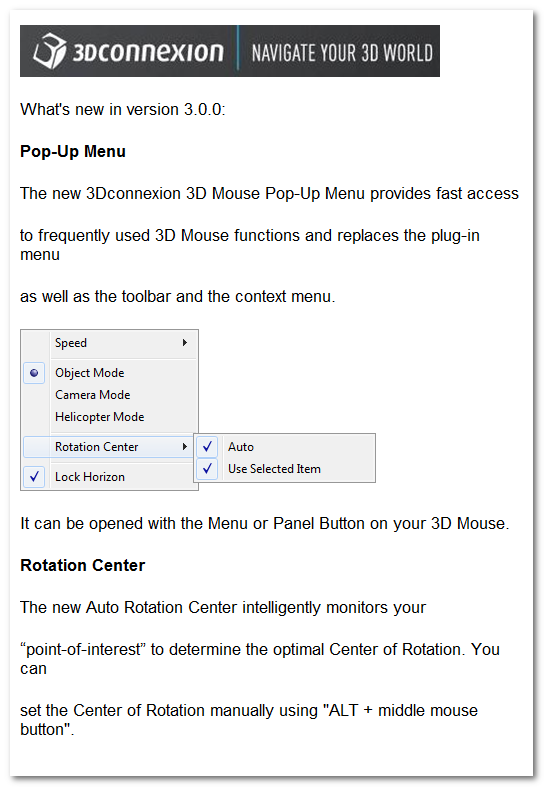
anscheinend gibt es eine neue komfortable Art und Weise, das Rotationszentrum in SketchUp zu setzen, wie mir ein Informationsfenster nach dem Treiberupdate heute mitteilt:
Image

Bleibt nur die Frage, wo ist der "Menu or Panel Button on my Space Navigator"...???

Sprich, wie bringe ich das neue, oben gezeigte Menü in SketchUp zum Erscheinen, wenn ich einen Space Navigator benutze?

Vielen Dank schonmal für diesbezügliche Aufklärung,

Grüße David.P
ngomes
Moderator
Moderator
Posts: 3458
Joined: Mon Nov 27, 2006 7:22 am
Contact:

Re: Wo ist das "new 3Dconnexion 3D Mouse Pop-Up Menu&am

Post by ngomes »

Hi David.P,

(I'm not very familiar with German but I'll try my best.)
David.P wrote:Bleibt nur die Frage, wo ist der "Menu or Panel Button on my Space Navigator"...???
In SketchUp, that will be the left button.
David.P wrote:Sprich, wie bringe ich das neue, oben gezeigte Menü in SketchUp zum Erscheinen, wenn ich einen Space Navigator benutze?
The pop-up menu should just come on when you press the left button if SketchUp is the foreground (active) application. If this is not working, it may be because there is a driver function assigned to that button. Without closing SketchUp, open the 3DxWare Control Panel and ensure the "SketchUp" configuration is the one selected, return to SketchUp and try pressing the left button.
Nuno Gomes
David.P
Posts: 77
Joined: Mon Aug 04, 2008 3:36 am

Post by David.P »

Hi ngomes,

thanks. I have assigned some custom Sketchup actions to the two buttons. There is a list of about 30 things to choose from and to assign to the buttons in the 3DxWare Control Panel.

But which one of all those possible actions is the standard action (that brings up the menu mentioned initially)?
ngomes
Moderator
Moderator
Posts: 3458
Joined: Mon Nov 27, 2006 7:22 am
Contact:

Post by ngomes »

David.P wrote:But which one of all those possible actions is the standard action (that brings up the menu mentioned initially)?
If you select the "SketchUp" configuration (the default no user name in the title), it will set the buttons to the correct default.

Alternatively -- and as you asked, you can pick the function "Pop-up Menu" and assign it to any button.
David.P
Posts: 77
Joined: Mon Aug 04, 2008 3:36 am

Post by David.P »

Thanks! That did the trick.

Cheers David.P
Post Reply