Issues with 3Dconnexion

Questions and answers about 3Dconnexion devices on macOS.

Moderator: Moderators

Post Reply
brookeborba
Posts: 2
Joined: Wed Oct 16, 2024 12:40 am

Issues with 3Dconnexion

Post by brookeborba »

Hello,
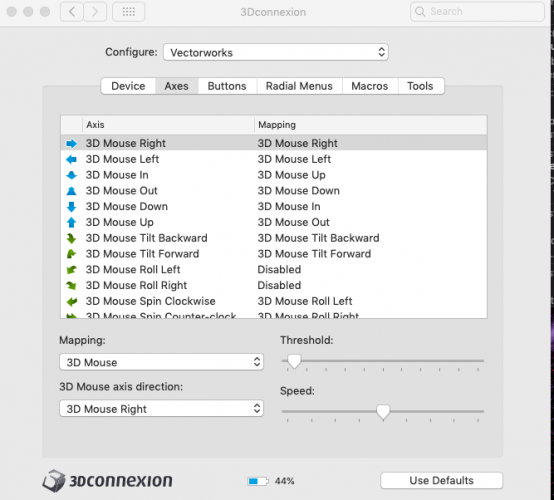
I'm new to the forum. I just purchased a 3D Connexion Spacemouse Wireless and i can not seem to get it to work completely. I have watched the videos online and set settings on the app. I can get macros working and the radial menus and buttons but i can not get the movement to work at all. I have messed with all the threshold settings and speeds but nothing. Is there a step i am missing somewhere? Here are my settings currently and all thresholds and speeds are set to the same for every axis.
Image
skmiec
Moderator
Moderator
Posts: 162
Joined: Thu Jan 11, 2024 5:02 am
Contact:

Re: Issues with 3Dconnexion

Post by skmiec »

Hi brookeborba,

Which version of the 3DxWare driver do you use?
brookeborba
Posts: 2
Joined: Wed Oct 16, 2024 12:40 am

Re: Issues with 3Dconnexion

Post by brookeborba »

I'm using Version 10.9.1
skmiec
Moderator
Moderator
Posts: 162
Joined: Thu Jan 11, 2024 5:02 am
Contact:

Re: Issues with 3Dconnexion

Post by skmiec »

But the screenshot you attached is from macOS system where the newest driver is 10.8.5.
You face the problem on macOS or Windows?
MikeTaku
Posts: 19
Joined: Thu Oct 03, 2024 6:35 am

Re: Issues with 3Dconnexion

Post by MikeTaku »

I'm also a bit confused because the screenshot is from macOS. Can you explain whether you're having problems with Windows or macOS?
Post Reply