I just upgraded to SW 2105, svc. pack 4.0 (from 2013). The model will zoom, pan and rotate, but the assignable buttons do not work. The LCD display indicates the same assignments as I had in 2013, but they do not activate any SW commands. When I launch the button mapping window, the section of the window that has the list of SW commands is blank (see attachment below). The 3DConnexion Add-In box is checked.
Additionally, the Alt, Cntrl, Esc, and Shift keys do not work.
I am using what I believe is the latest driver for the SpacePilot:
Release Version 3.16.3,
Driver Version 6.16.1
Firmware Version 3.12
My OS is Windows 7 Professional svc. pack 1
Any ideas? Thanks in advance,
CR
SpacePilot mapped buttons do not work with SolidWorks 2015
Moderator: Moderators
-
CR_Magruder
- Posts: 6
- Joined: Thu Oct 29, 2015 5:05 pm
Re: SpacePilot mapped buttons do not work with SolidWorks 20
For SolidWorks 2015 you need a more recent driver. Our latest driver 3DxWare 10.2.9 can be downloaded here.
Uta
3Dconnexion
3Dconnexion
-
CR_Magruder
- Posts: 6
- Joined: Thu Oct 29, 2015 5:05 pm
Re: SpacePilot mapped buttons do not work with SolidWorks 20
Hi Uta,
I have tried to update the drivers two ways, one is using the exe file you recommend, and the other is to use the"Update Wizard" in the 3D Connection Control Panel. Neither method worked, as there were errors that caused the update to fail.
Using the first method, I get eight errors where the program cannot get access to a series of files. Here is the first message: Some of these messages are for software I don't use, such as AutoCad. But one of the last messages is for SolidWorks: After eight of these errors, I get this message: I click "OK" and the installation terminates without actually updating the driver.
Looks like I can only add thee attachments per post. I will describe the faults using the Wizard in a subsequent post.
CR
I have tried to update the drivers two ways, one is using the exe file you recommend, and the other is to use the"Update Wizard" in the 3D Connection Control Panel. Neither method worked, as there were errors that caused the update to fail.
Using the first method, I get eight errors where the program cannot get access to a series of files. Here is the first message: Some of these messages are for software I don't use, such as AutoCad. But one of the last messages is for SolidWorks: After eight of these errors, I get this message: I click "OK" and the installation terminates without actually updating the driver.
Looks like I can only add thee attachments per post. I will describe the faults using the Wizard in a subsequent post.
CR
-
CR_Magruder
- Posts: 6
- Joined: Thu Oct 29, 2015 5:05 pm
Re: SpacePilot mapped buttons do not work with SolidWorks 20
If I use the Update Wizard, the first error message I get is this:
The path that the program is looking for does not exist; specifically the "pft60F6.tmp folder. I tried searching the entire C:\ drive to find the 3DxMaya64.msi file, and came up with nothing.
If I click "OK" after the above message, I get this popup: Any idea of where I can get this msi file and any others I need to point the Wizard to?
Thanks!
CR
If I click "OK" after the above message, I get this popup: Any idea of where I can get this msi file and any others I need to point the Wizard to?
Thanks!
CR
Re: SpacePilot mapped buttons do not work with SolidWorks 20
Hello CR,
I recommend that you first try to install the driver that you had previously installed. Re-install it and the un-install it. Then you should be able to install the latest version. Let me know if this works.
Uta
3Dconnexion
3Dconnexion
-
CR_Magruder
- Posts: 6
- Joined: Thu Oct 29, 2015 5:05 pm
Re: SpacePilot mapped buttons do not work with SolidWorks 20
Hi Uta,
I have uninstalled the old driver using Windows Control Panel -> Programs -> Programs & Features, then selecting uninstall for the old driver.
The new driver apparently installed, but with the same errors as listed in the second post above. Now the Control Panel "Uninstall or change a program" window shows the 10.2.9 driver. However, the 3D control panel "about" function shows the old driver: The SpacePilot behaves the same-- none of the mapped buttons, nor the shift, esc, ctrl, or alt buttons work. The zoom, pan and rotate functions as before.
Any other ideas?
Thanks!
CR
I have uninstalled the old driver using Windows Control Panel -> Programs -> Programs & Features, then selecting uninstall for the old driver.
The new driver apparently installed, but with the same errors as listed in the second post above. Now the Control Panel "Uninstall or change a program" window shows the 10.2.9 driver. However, the 3D control panel "about" function shows the old driver: The SpacePilot behaves the same-- none of the mapped buttons, nor the shift, esc, ctrl, or alt buttons work. The zoom, pan and rotate functions as before.
Any other ideas?
Thanks!
CR
Re: SpacePilot mapped buttons do not work with SolidWorks 20
Hello CR_Magruder,
you have definitely the wrong driver panel. Maybe you try again uninstalling everything. Do it as described here. After you uninstalled the driver make sure you do not have any files left from the installation. By default the driver installs to c:\Program Files\3Dconnexion. This folder should be removed after the de-installation finished.
The newer driver - 3DxWare 10 - and the legacy driver - 3DxSoftware 3.x.x - are not compatible. You cannot have both installed and all files from the legacy driver should be removed before you install 3DxWare 10. I cannot imagine how you were able to get to the situation you described!

you have definitely the wrong driver panel. Maybe you try again uninstalling everything. Do it as described here. After you uninstalled the driver make sure you do not have any files left from the installation. By default the driver installs to c:\Program Files\3Dconnexion. This folder should be removed after the de-installation finished.
The newer driver - 3DxWare 10 - and the legacy driver - 3DxSoftware 3.x.x - are not compatible. You cannot have both installed and all files from the legacy driver should be removed before you install 3DxWare 10. I cannot imagine how you were able to get to the situation you described!
Uta
3Dconnexion
3Dconnexion
-
CR_Magruder
- Posts: 6
- Joined: Thu Oct 29, 2015 5:05 pm
Re: SpacePilot mapped buttons do not work with SolidWorks 20
Hi Uta,
Well, that was a little clunky but finally it is working. I followed your procedure to remove the old driver and its references, which worked. When I installed the v10 driver, there were some errors as before. When I tried to run the driver, I got this error:
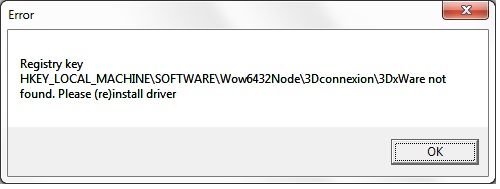
Re-installing the driver did not work.
So I restored the registry to the state prior to installing the v10 driver. Still did not work. When I tried to repair the install, I got an error something like "Can't find the file 3DxWinCore64.msi. It was looking for it in a folder C:\users\user_name\AppData\Local\Temp\someTempFileName.tmp\Components64, but there was no such folder. I searched the path under AppData and found the file from a previous install in a different temp folder, and pointed to the alternate location. Then the update completed normally.
After all this, the driver finally works with SW 2015. Hallelujah-- I thought that since my SpacePilot is discontinued I now had a $500 brick on my desk that was not broken except for the software. Thank you 3DConnexion for not leaving a discontinued product stranded. If my functional SpacePilot was now non-functional because of a SolidWorks update, I think I would be mad enough to not buy a new 3DConnexion product-- I would just learn to live without it.
Thanks for your help in getting the problems sorted out. I am a happy customer.
CR
Well, that was a little clunky but finally it is working. I followed your procedure to remove the old driver and its references, which worked. When I installed the v10 driver, there were some errors as before. When I tried to run the driver, I got this error:
Re-installing the driver did not work.
So I restored the registry to the state prior to installing the v10 driver. Still did not work. When I tried to repair the install, I got an error something like "Can't find the file 3DxWinCore64.msi. It was looking for it in a folder C:\users\user_name\AppData\Local\Temp\someTempFileName.tmp\Components64, but there was no such folder. I searched the path under AppData and found the file from a previous install in a different temp folder, and pointed to the alternate location. Then the update completed normally.
After all this, the driver finally works with SW 2015. Hallelujah-- I thought that since my SpacePilot is discontinued I now had a $500 brick on my desk that was not broken except for the software. Thank you 3DConnexion for not leaving a discontinued product stranded. If my functional SpacePilot was now non-functional because of a SolidWorks update, I think I would be mad enough to not buy a new 3DConnexion product-- I would just learn to live without it.
Thanks for your help in getting the problems sorted out. I am a happy customer.
CR
